Apple Mail MCP
The only Apple Mail MCP server with full-coverage FTS5 body search. Reliable on large mailboxes where AppleScript-based servers timeout — with 8 tools for reading, searching, and extracting email content. Also works as a standalone CLI.
Why Apple Mail MCP?
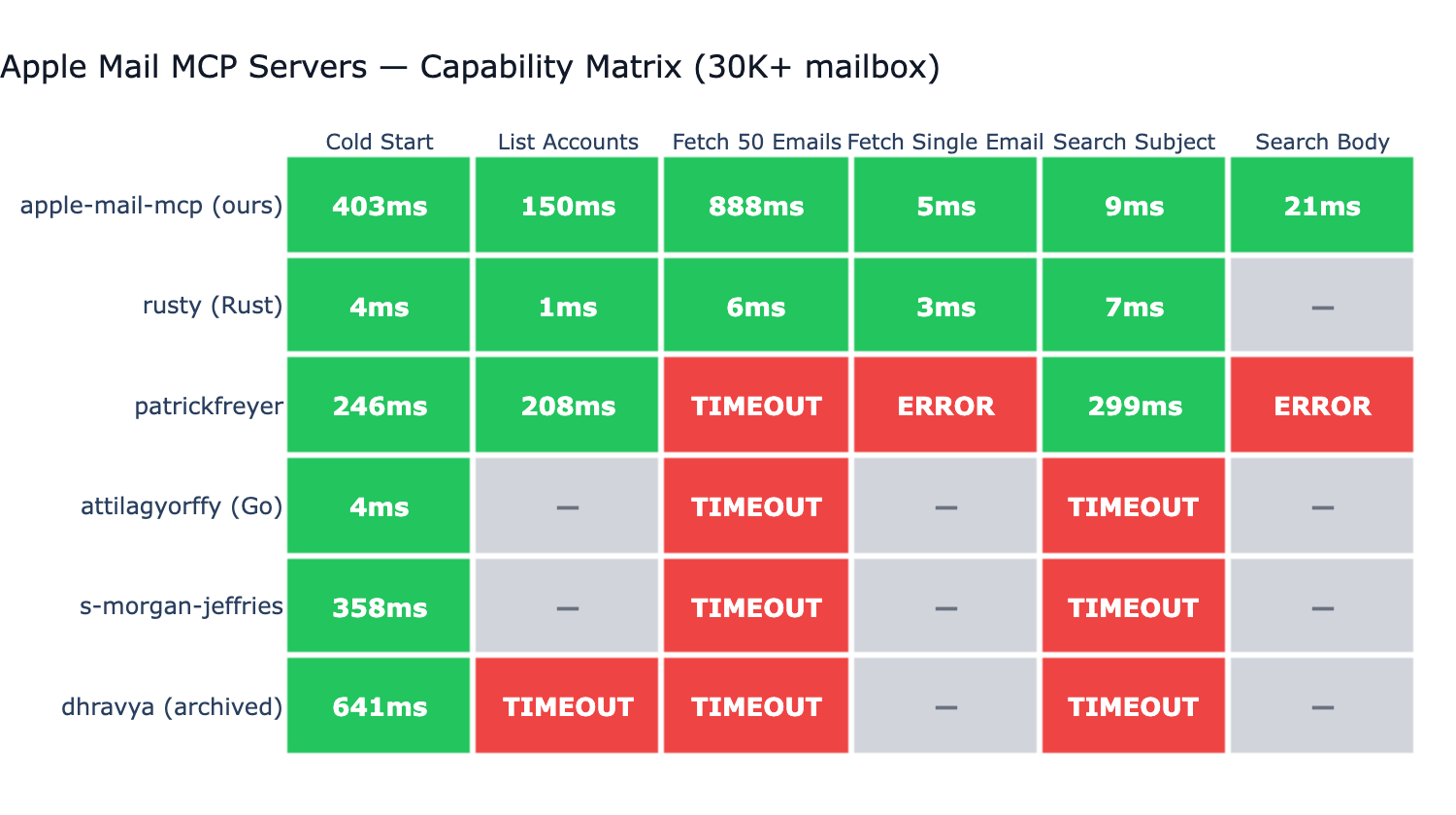
Tested against 6 other Apple Mail MCP servers on a real ~73K-message mailbox:
- Only server with full-coverage body search. Most competitors don't support body search at all; the one that does (BastianZim) caps at the 5000 most recent messages — silent miss on older mail. Our FTS5 covers the entire mailbox.
- ~3ms single email fetch via disk-first
.emlxreading. - ~7ms subject search via FTS5 — competitive with native Rust on the same operation.
- Reliable across all 6 benchmarked operations at this mailbox size — AppleScript-based servers timeout, throw syntax errors, or skip operations.
Key Features
- 8 MCP tools + CLI — search, read, list, extract attachments and links — usable as MCP server or standalone CLI
- Unified filtering — unread, flagged, today, last 7 days
- FTS5 search index — full-text body search in ~2ms with BM25 ranking
- Real-time updates —
--watchflag for automatic index updates - Disk-first sync — fast filesystem scanning instead of slow JXA queries
- Type-safe — full Python type hints with PEP 561
py.typedmarker
Quick Install
Claude Code — one plugin install:
Claude Desktop — download apple-mail-mcp-<version>.mcpb from the latest release and double-click it.
Any MCP client — install the package and register the command:
That's it. Ask Claude to search your emails, get today's messages, or find unread mail. See Installation for all options and Getting Started for building the search index.
CLI Usage (No MCP Required)
All tools also work as standalone CLI commands:
apple-mail-mcp search "quarterly report" --after 2026-01-01
apple-mail-mcp read 12345
apple-mail-mcp emails --filter unread --limit 10
Generate a Claude Code skill for CLI-based access:
Next Steps
- Getting Started — first-use walkthrough
- Installation — all installation methods
- Tools — full API reference for all 8 tools
- Search & Indexing — FTS5 deep dive
- Architecture — how it works under the hood
- Architecture Deep Dive —
.emlxformat, JXA IPC, FTS5 index design - Benchmarks — competitive performance data